



【我們為什麼挑選這篇文章】可愛的小恐龍幾乎成為 Chrome 瀏覽器的標誌,偶爾斷線時幾乎都會按下空白鍵玩個幾場。
現在這個小遊戲被 AI 開發者當作練習的目標,這篇文章就是量子位的教學編譯,看完就去教教你的 AI 當個真正的馴龍高手吧。(責任編輯:康陳剛)
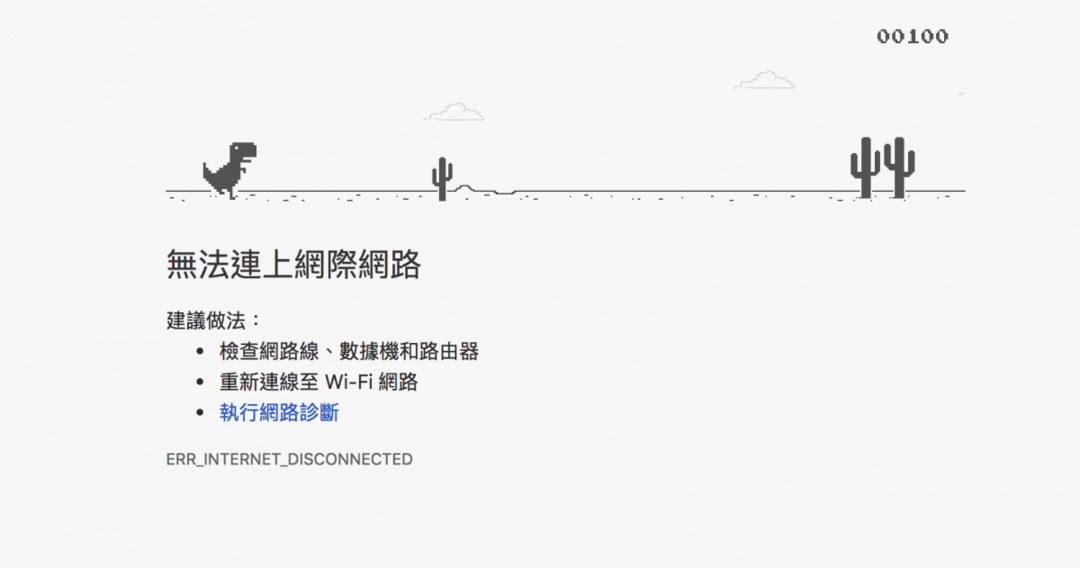
「無法連上網際網路」。作為一個 Google Chrome 瀏覽器的用戶,當你看到上面那個頁面時,不要沮喪。換個角度一想,順便玩個小恐龍也不錯!
當你遇到打不開網頁的時候,只要再點擊一下這個頁面,或者按下空白鍵,這隻小恐龍就會輕輕一跳,陪你度過沒有網路的時光。
這個「恐龍跳一跳」其實是藏在 Chrome 瀏覽器裡好多年的一個彩蛋。2013 年 Chrome 開始用這個小恐龍的圖像,代替令人煩惱的404頁面。2014年秋天,這只恐龍被正式改造成一個橫版小遊戲,以彩蛋的方式隱藏在新版Chrome瀏覽器裡。
小恐龍被 AI 凌虐
後來,這個小遊戲也成了不少 AI 練習的對象。
比如最近就有人在 YouTube 上傳了一段影片,展示他如何用神經網絡 + 遺傳演算法,讓一個AI系統獨秀於瀏覽器之中。
↓影片就在這了↓
動圖版:總而言之,一句話,這個AI能輕鬆玩到2萬多分……

你能玩到幾分?
大概一輩子都玩不到這個成績吧,畢竟在紀錄上,人類玩家的歷史最高分是18842。
全球開發者必去的 IT 盛會報名開跑!
微軟 Ignite The Tour,快速升級你的 AI 技術
2020.2.17 -18 台北世貿中心》免費報名參加
怎麼做到的呢?
上傳這段影片的作者,並沒有詳細公佈他用的方法,當然也沒有給出一個開源的網址。但不要緊,也有別人公開分享了更多細節。
例如,GitHub 上就有一個開源的代碼「IAMDinosaur」,同樣也是利用神經網絡+遺傳演算法,來搞定這隻小恐龍。(網址在此:ivanseidel/IAMDinosaur)
美中不足,上面這個項目也沒有配上太詳盡的解讀。然而好消息是,最近有個國外的小哥 Ravi Munde,列了一份非常詳盡的教學。
這個教學用的方法是強化學習中的 Q-learning,比較適合入門練習,而且對硬體的要求不高。
以下是量子位的編譯。
Q-learning瞭解/複習一下
對動物來說,強化學習的能力是與生俱來的。拿兒童學走路來舉例,如果小朋友努力邁出第一步,就會獲得父母的鼓勵——可能是鼓掌叫好,也可能是一塊糖;但如果小朋友堅決不肯學習走路,那父母就不會給他們糖吃了。
強化學習就是依照這類激勵行為而設置的。
在這個遊戲中,對我們的 AI小恐龍來說,強化學習需要讓他在無監督的情況下,先認識到做出不同動作的結果,並且以獲得高分為最高激勵。

Ravi Munde 用 Q-learning 模擬了一個特殊函數,這個函數驅動 AI 在不同狀況下做出正確的選擇。
Q-learning是強化學習的一種無模型實現,根據Q值對每個狀態進行判斷此時如果採取行動,能獲得怎樣的獎勵。一個樣本Q表讓我們瞭解數據的結構。在恐龍跑酷遊戲中,狀態是當前的遊戲截圖,能採取的行動是跳或不跳[0,1]

Ravi Munde決定用深度神經網絡來決定小恐龍何時起跳,而且要在最簡單的強化學習實現基礎上,引入不同參數來輔助它。
缺乏已標記的數據讓強化學習非常不穩定。為了獲得適用於這個遊戲的數據,Munde小哥決定,先讓小恐龍自己瞎跳幾千次,把每個動作的反饋記下來,然後從數據中隨機挑選一些來訓練模型。
但之後,Munde小哥發現,他訓練了一個倔強的模型——模型堅定的認為,跳,一定比不跳好。所以,為了讓模型在訓練時能在跳與不跳之間多嘗試一下,他引入了一個函數ɛ來決定行動的隨機性,然後再逐漸減小它的值來削減隨機性,最終讓模型去選擇最有可能獲得獎勵的行動。
讚譽分布(Credit Assignment)問題可能會讓模型陷入混亂——目前獲得的獎勵究竟來自於過去的哪個行為呢?在恐龍跑酷遊戲中,小恐龍跳到半空中後無法再次跳躍,但模型可能會在恐龍處於半空中時發出跳躍指令,這種情況就讓恐龍非常容易砸到仙人掌上。
在這種情況下,「砸到仙人掌上」這個負反饋實際上是上一次做出跳躍決定的結果,而不是剛剛恐龍在半空中時做出的跳躍結果所導致的。
在面臨這種問題的情況下,可以引入貼現因子(Discount Factor)γ來決定模型做出動作時看得多遠。γ間接解決了贊譽分布問題,在這個遊戲中,當γ=0.99時,模型認識到在無障礙時隨便跳會導致真的遇到障礙時自己正在半空中,無法繼續跳躍。
除了這兩個參數之外,後面就幾乎不需要任何參數了。
#game parameters
GAMMA =0.99# decay rate of past observations original 0.99
OBSERVATION =50000.# timesteps to observe before training
EXPLORE =100000# frames over which to anneal epsilon
FINAL_EPSILON =0.0001# final value of epsilon
INITIAL_EPSILON =0.1# starting value of epsilon
REPLAY_MEMORY =50000# number of previous transitions to remember
BATCH =32# size of minibatch
FRAME_PER_ACTION =1
你需要準備的是
- Python 3.6
- Selenium
- OpenCV
- PIL
- Chromium driver for Selenium
- Keras
稍微解釋一下這幾個工具。
構建這個AI模型,需要用Python編程。而遊戲是用JavaScript寫成的。所以,得借助一些工具才能更好地溝通。
Selenium是一種流行的瀏覽器自動化工具,用於向瀏覽器發送操作指令,以及獲取各種遊戲參數。
接口的事情搞定了,還得想辦法獲得遊戲截屏。用Selenium也行,但是速度很慢,截屏和處理一次大約得1秒鐘。
用PIL和OpenCV能夠更好地完成截屏和圖像預先處理,可以達到5fps的幀率。你可能覺得還是慢,但已經足夠對付這個遊戲了。
遊戲模組
下面這個模組,實現了Python和瀏覽器(使用Selenium)的溝通。
”’
* Game class: Selenium interfacing between the python and browser
* __init__(): Launch the broswer window using the attributes in chrome_options
* get_crashed() : return true if the agent as crashed on an obstacles. Gets javascript variable from game decribing the state
* get_playing(): true if game in progress, false is crashed or paused
* restart() : sends a signal to browser-javascript to restart the game
* press_up(): sends a single to press up get to the browser
* get_score(): gets current game score from javascript variables.
* pause(): pause the game
* resume(): resume a paused game if not crashed
* end(): close the browser and end the game
”’
class Game:
def __init__(self,custom_config=True):
chrome_options = Options()
chrome_options.add_argument(“disable-infobars”)
self._driver = webdriver.Chrome(executable_path = chrome_driver_path,chrome_options=chrome_options)
self._driver.set_window_position(x=-10,y=0)
self._driver.set_window_size(200, 300)
self._driver.get(os.path.abspath(game_url))
#modifying game before training
if custom_config:
self._driver.execute_script(“Runner.config.ACCELERATION=0”)
def get_crashed(self):
return self._driver.execute_script(“return Runner.instance_.crashed”)
def get_playing(self):
return self._driver.execute_script(“return Runner.instance_.playing”)
def restart(self):
self._driver.execute_script(“Runner.instance_.restart()”)time.sleep(0.25)# no actions are possible
# for 0.25 sec after game starts,
# skip learning at this time and make the model wait
def press_up(self):self._driver.find_element_by_tag_name(“body”).send_keys(Keys.ARROW_UP)
def get_score(self):
score_array = self._driver.execute_script(“return Runner.instance_.distanceMeter.digits”)score = ”.join(score_array) # the javascript object is of type array with score in the formate[1,0,0] which is 100.
return int(score)
def pause(self):
return self._driver.execute_script(“return Runner.instance_.stop()”)
def resume(self):
return self._driver.execute_script(“return Runner.instance_.play()”)
def end(self):
self._driver.close()
恐龍智能體模組
這個模組在遊戲模組的幫助下,用於控制小恐龍的動作。
class DinoAgent:
def __init__(self,game): #takes game as input for taking actions
self._game = game;
self.jump(); #to start the game, we need to jump once
time.sleep(.5) # no action can be performed for the first time when game starts
def is_running(self):
return self._game.get_playing()
def is_crashed(self):
return self._game.get_crashed()
def jump(self):
self._game.press_up()
def duck(self):
self._game.press_down()
遊戲狀態模組
神經網絡直接使用這個模組,來執行操作並獲取新的狀態。
”’
get_state(): accepts an array of actions,
performs the action on the agent
returns : new state, reward and if the game ended.
”’
class Game_sate:
def __init__(self,agent,game):
self._agent = agent
self._game = game
def get_state(self,actions):
score = self._game.get_score()
reward = 0.1*score/10 # dynamic reward calculation
is_over = False #game over
if actions[1] == 1: #else do nothing
self._agent.jump()
reward = 0.1*score/11
image = grab_screen()if self._agent.is_crashed():
self._game.restart()
reward = -11/score
is_over = True
return image, reward, is_over #return the Experience tuple
預先處理
遊戲修改
原始的遊戲相對複雜,比如遊戲速度會逐漸加快,障礙物會改變,還會出現雲朵、星星、地面紋理等。一次同時學習這麼多東西會消耗大量時間,甚至在訓練過程中引入不必要的噪音。
為此作者修改了遊戲的源代碼、簡化畫面,去除了一些視覺元素(雲、歷史最佳成績等),還有讓恐龍的奔跑速度保持不變。


圖像處理
原始截圖的分辨率為1200×300,包含三個通道。作者計劃使用4個連續的屏幕截圖作為模型的單一輸入,也就是1200×300×3×4。
問題是,這個小哥只有一個i7的CPU可用,所以他的電腦沒辦法在處理這個尺寸輸入的同時玩遊戲。所以,還得繼續用OpenCV的庫調整截圖大小、裁剪等。最終輸入圖像大小為40×20像素,單通道,並用Canny突出顯示邊緣。
def grab_screen(_driver = None):
#bbox = region of interest on the entire screen
screen = np.array(ImageGrab.grab(bbox=(40,180,440,400)))
image = process_img(screen)#processing image as required
return imagedef process_img(image):
#game is already in grey scale canvas, canny to get only edges and reduce unwanted objects(clouds)
# resale image dimensions
image = cv2.resize(image, (0,0), fx = 0.15, fy = 0.10)
#crop out the dino agent from the frame
image = image[2:38,10:50] #img[y:y+h, x:x+w]
image = cv2.Canny(image, threshold1 = 100, threshold2 = 200) #apply the canny edge detection
return image
然後,堆疊4張圖創建單個輸入,也就是:40×20×4。請注意,這裡小恐龍也裁減掉了,因為整個學習過程,只需要知道障礙物和與邊緣的距離即可。

模型架構
現在輸入有了,用模型輸出來玩遊戲的方法也有了,只差模型架構。
小哥選擇把3個卷積層壓平,連接到一個512神經元的全連接層(dense layer)上。池化層直接被砍掉了,這個東西在圖像分類問題上很有用,但是玩Dino的時候神經網絡只需要知道障礙物的位置,池化層就起不了什麼作用了。

這個模型的輸出,形狀和可能的操作數量一樣。模型會預測各種操作的Q值,也叫discounted future reward,然後我們選數值最高的那個。
下面這段代碼,就能召喚一個用TensorFlow後端的Keras來搭建的模型:
#model hyper parameters
LEARNING_RATE = 1e-4
img_rows , img_cols = 40,20
img_channels = 4 #We stack 4 frames
ACTIONS = 2
def buildmodel():
print(“Now we build the model”)
model = Sequential()
model.add(Conv2D(32, (8, 8), strides=(4, 4), padding=’same’,input_shape=(img_cols,img_rows,img_channels))) #20*40*4
model.add(Activation(‘relu’))
model.add(Conv2D(64, (4, 4), strides=(2, 2), padding=’same’))
model.add(Activation(‘relu’))
model.add(Conv2D(64, (3, 3), strides=(1, 1), padding=’same’))
model.add(Activation(‘relu’))
model.add(Flatten())
model.add(Dense(512))
model.add(Activation(‘relu’))
model.add(Dense(ACTIONS))
adam = Adam(lr=LEARNING_RATE)
model.compile(loss=’mse’,optimizer=adam)
print(“We finish building the model”)
return model
開始訓練
接下來,就是見證奇跡的時刻!
也就是用一段代碼來訓練模型,這段代碼的任務是:
- 從無操作開始,得到初始狀態initial state(s_t)
- 觀察玩遊戲的過程,代碼中的OBSERVATION表示步數
- 預測一個操作的效果
- 在Replay Memory中存儲經驗
- 訓練階段,從Replay Memory里隨機選擇一組,用它來訓練模型
- 如果game over了,就重開一局
更詳細的,可以看這段自帶注釋的代碼:
”’
Parameters:
* model => Keras Model to be trained
* game_state => Game State module with access to game environment and dino
* observe => flag to indicate wherther the model is to be trained(weight updates), else just play
”’
def trainNetwork(model,game_state):
# store the previous observations in replay memory
D = deque() #load from file system
# get the first state by doing nothing
do_nothing = np.zeros(ACTIONS)
do_nothing[0] =1 #0 => do nothing,
#1=> jumpx_t, r_0, terminal = game_state.get_state(do_nothing) # get next step after performing the action
s_t = np.stack((x_t, x_t, x_t, x_t), axis=2).reshape(1,20,40,4) # stack 4 images to create placeholder input reshaped 1*20*40*4OBSERVE = OBSERVATION
epsilon = INITIAL_EPSILON
t = 0
while (True): #endless runningloss = 0
Q_sa = 0
action_index = 0
r_t = 0 #reward at t
a_t = np.zeros([ACTIONS]) # action at t#choose an action epsilon greedy
if random.random() <= epsilon: #randomly explore an action
print(“———-Random Action———-“)
action_index = random.randrange(ACTIONS)
a_t[action_index] = 1
else: # predict the output
q = model.predict(s_t) #input a stack of 4 images, get the prediction
max_Q = np.argmax(q) # chosing index with maximum q value
action_index = max_Q
a_t[action_index] = 1 # o=> do nothing, 1=> jump#We reduced the epsilon (exploration parameter) gradually
if epsilon > FINAL_EPSILON and t > OBSERVE:
epsilon -= (INITIAL_EPSILON – FINAL_EPSILON) / EXPLORE#run the selected action and observed next state and reward
x_t1, r_t, terminal = game_state.get_state(a_t)
last_time = time.time()
x_t1 = x_t1.reshape(1, x_t1.shape[0], x_t1.shape[1], 1) #1x20x40x1
s_t1 = np.append(x_t1, s_t[:, :, :, :3], axis=3) # append the new image to input stack and remove the first one# store the transition in D
D.append((s_t, action_index, r_t, s_t1, terminal))
D.popleft() if len(D) > REPLAY_MEMORY#only train if done observing; sample a minibatch to train on
trainBatch(random.sample(D, BATCH)) if t > OBSERVE
s_t = s_t1
t = t + 1
print(“TIMESTEP”, t, “/ EPSILON”, epsilon, “/ ACTION”, action_index, “/ REWARD”, r_t,”/ Q_MAX ” , np.max(Q_sa), “/ Loss “, loss)
將這個模型用到從 Replay Memory 裡隨機挑選的一批上
def trainBatch(minibatch):
for i in range(0, len(minibatch)):
loss = 0
inputs = np.zeros((BATCH, s_t.shape[1], s_t.shape[2], s_t.shape[3])) #32, 20, 40, 4
targets = np.zeros((inputs.shape[0], ACTIONS)) #32, 2
state_t = minibatch[i][0] # 4D stack of images
action_t = minibatch[i][1] #This is action index
reward_t = minibatch[i][2] #reward at state_t due to action_t
state_t1 = minibatch[i][3] #next state
terminal = minibatch[i][4] #wheather the agent died or survided due the action
inputs[i:i + 1] = state_t
targets[i] = model.predict(state_t) # predicted q values
Q_sa = model.predict(state_t1) #predict q values for next stepif terminal:
targets[i, action_t] = reward_t # if terminated, only equals reward
else:
targets[i, action_t] = reward_t + GAMMA * np.max(Q_sa)loss += model.train_on_batch(inputs, targets)
主體方法
調用下面的方法,就能啓動上面的訓練流程:
#argument: observe, only plays if true, else trains
def playGame(observe=False):
game = Game()
dino = DinoAgent(game)
game_state = Game_sate(dino,game)
model = buildmodel()
trainNetwork(model,game_state)
結果
這個模型,小哥用一周的時間訓練了200萬幀,其中前100萬幀用來調整遊戲參數修補bug,後100萬幀真正用來訓練。
現在,這個模型的最好成績是265分。從下面的得分和損失變化圖里,能看出模型的loss在後100萬幀逐漸穩定,比較低,但是會隨時間波動。
目前的局限
雖然這個模型後來表現還算可以了,但比人類還是差了一大截。
當然,別忘了這個小哥比較窮,他只有一個i7的CPU。他認為,模型學得還不夠快,得分還不夠高,要怪這樣幾個因素:一是因為用CPU來學習,它總是掉幀;二是供這個AI來玩耍的圖像實在是太小了,只有40×20,在當前的模型架構下就可能導致了特徵的損失,還拖慢了學習速度。
如果改用GPU,說不定……,用GPU究竟會不會改善,你們可以拿這份代碼來試試:
ravi72munde/Chrome-Dino-Reinforcement-Learning
(原文網址在此)
(本文經 量子位 授權轉載,並同意 TechOrange 編寫導讀與修訂標題,原文標題為 〈Chrome暗藏的恐龙跳一跳,已经被AI轻松掌握了 〉;首圖來源:Chrome。)
延伸閱讀
微軟內部 AI 課程免費開放!一毛不花,也能學會建立機器學習模型
Google 智慧台灣計畫啟動!釋出 300 個職缺,要將台灣打造成亞洲 AI 戰略基地
【附學習資源】無人超市 AI 系統怎麼做?教你用影像辨識技術開一家 Amazon Go!